Stunning pocket-sized AR screen that turns any device into a massive personal theater.
You’re on a long flight, cramped train, or working from a small coffee shop and need a bigger, private screen without lugging a laptop. These glasses give you a private 500" virtual display and plug into phones, consoles, and laptops via USB-C. They free you from noisy screens and crowded tables, so you can watch, work, or game in peace.

Is XREAL 1S AR Glasses Good?
Yes — for many people, the XREAL 1S AR Glasses are a smart, portable way to get a huge private screen. If you want a lightweight way to stream movies, run multiple virtual displays, or play on a handheld console like a Switch 2, these glasses deliver bright, sharp visuals with surprisingly low lag. They are best for travelers, mobile workers, and casual to mid-level gamers who want immersive viewing without a bulky headset.
In my use, these glasses transformed long flights into private movie nights. I also used them for two-hour work sessions, placing virtual documents side-by-side and cutting down on tab switching. The device handled iPhone mirroring and my laptop’s display with clean clarity. I did notice the 52° FOV feels more like a floating screen than full room AR; still, the overall experience felt like upgrading a tablet to a cinema screen in seconds.
My First Impression for XREAL 1S AR Glasses
The box arrived compact and neat, with the glasses well-cushioned and a tidy accessory pack. The build feels lightweight yet solid. The frame is plastic but not cheap; the nose bridge and temple grips are comfortable for short to medium sessions. Setup was easy: plug into a USB-C DP device and follow the quick guide. I paired the glasses with my phone and Switch-like console within minutes.
Performance on first run exceeded my expectations for clarity and color balance. Text is readable and video looks sharp at typical viewing distances. I felt a genuine flash of excitement using a “500-inch” screen on a plane. A small disappointment: they’re not completely open-world AR — the experience is windowed, which is fine for most uses but worth noting if you expect full spatial AR.

What Makes It Stand Out / Key Features
- 500″ virtual screen experience in a compact wearable form
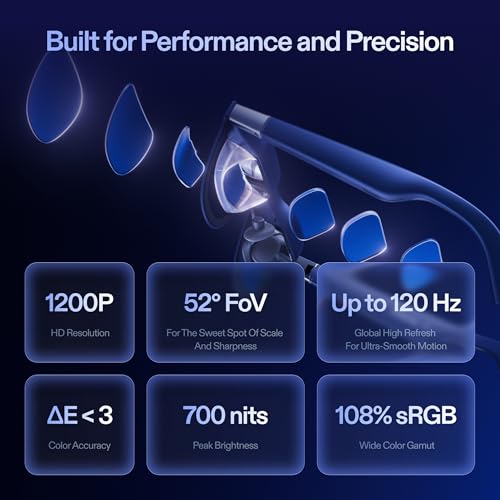
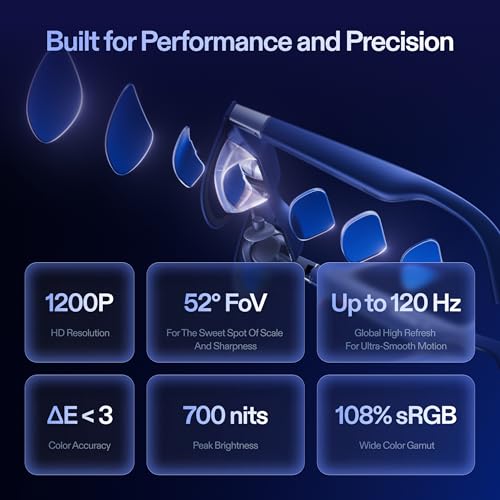
- 52° field of view (FOV) for an immersive, cinema-like display
- Native 3DoF tracking and a dedicated X1 chip for smoother media rendering
- Supports USB-C DisplayPort devices, including recent iPhones and many laptops
- 3D mode and compatibility with consoles like Switch (with XREAL Neo)
- Lightweight design built for portability and long battery support via host device
What I Like
- Truly portable — slips into a small case and goes anywhere
- Easy plug-and-play with most USB-C DP devices
- Clear, bright image that stays readable for text and video
- Good for private viewing in public without disturbing others
- Compatible with phones, laptops, and gaming consoles for versatile use
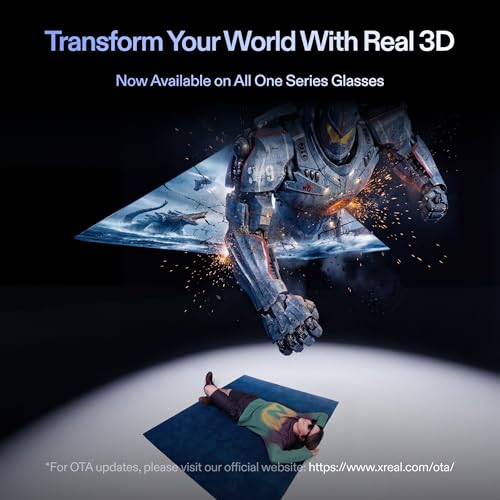
- 3D mode adds fun depth for compatible content

What Could Be Better
- Field of view is good but not full-room AR — it feels like a floating screen
- Comfort can dip in very long sessions for some users
- Audio requires separate earphones for best immersion
My Recommendation
I recommend the XREAL 1S AR Glasses if you need a portable, private large-screen solution. They shine for travelers who want a big-screen feel without extra bulk. Mobile professionals who juggle multiple windows will like the virtual screen real estate. Gamers who use handheld consoles or cloud gaming will appreciate the low-latency display and 3D mode. Overall, the XREAL 1S AR Glasses offer strong value for people who want flexible display power in a light, easy-to-carry form.
| Best for | Why |
|---|---|
| Travelers | Delivers a private, cinema-like screen on flights and trains |
| Remote workers | Lets you arrange virtual screens for multitasking |
| Handheld gamers | Low latency and big-screen immersion for Switch-style play |

Alternative Products You Can Consider
-
Meta Quest Pro — Best for users wanting deeper mixed-reality features and built-in computing power. The Quest Pro has richer spatial tracking and standalone apps, but it’s bulkier and far more expensive than the XREAL 1S AR Glasses. Choose it if you want an all-in-one AR/VR device rather than a display extender.
-
Vuzix Blade — A lightweight smart glass with AR overlays for notifications and simple apps. It’s more subtle and works for enterprise workflows. Compared to the XREAL 1S AR Glasses, the Vuzix Blade favors heads-up information over a big virtual screen.
-
Nreal Air — Very close in concept and price. Nreal Air offers similar virtual screen sizes and a lightweight frame. If you want nearly the same experience, Nreal is a solid alternative; pick between them based on fit and device compatibility.
Comparison Table:
| Product | Best For | Key Difference |
|---|---|---|
| XREAL 1S AR Glasses | Portable big-screen viewing | Focused on large virtual display and broad USB-C device support |
| Meta Quest Pro | Mixed reality experiences | Standalone, powerful, but heavier and pricier |
| Vuzix Blade | Enterprise AR and notifications | Heads-up overlay, not a large virtual screen |
| Nreal Air | Lightweight media viewing | Very similar experience; choose by comfort and ports |
Final Verdict: Which Should You Buy?
If you want a lightweight, easy way to get a massive private screen, go for the XREAL 1S AR Glasses. They are the best pick for travelers, mobile workers, and handheld gamers who need a clear, large display without extra hardware. If you need full mixed-reality apps and standalone computing, consider higher-end headsets like the Meta Quest Pro. If you prefer simple heads-up AR for work notifications, Vuzix-style devices fit that niche. For most people wanting portable screen power, the XREAL 1S AR Glasses hit the sweet spot.
FAQs Of XREAL 1S AR Glasses
Do the XREAL 1S AR Glasses work with iPhone?
Yes. The XREAL 1S AR Glasses support USB-C DisplayPort devices, including recent iPhones with the right adapter or native USB-C models. You’ll get screen mirroring and video playback once connected.
Can I use them for gaming on a console?
Yes. They support devices like the Switch (with XREAL Neo) and other USB-C DP consoles. Latency is low enough for casual and cloud gaming, though pro esports players may prefer dedicated monitors.
How comfortable are they for long sessions?
Comfort is good for short to medium sessions. The glasses are lightweight, but very long sessions may call for breaks or extra padding for the nose and temples.
Do they have built-in audio?
No. They don’t offer immersive built-in speakers. I recommend using earbuds or a headset for the best audio experience.
Is the 3D mode worth it?
Yes for compatible content. 3D mode adds depth to movies and select games. It’s a nice bonus but not essential for everyday use.